Built for Windows 10 and 11 · 64-bit

Attack on Titan Revolution
macro farms while AFK.

Record the grapple, boost, and attack sequence of one mission once. Press F10 to replay it on a hotkey and watch your character repeat the exact same inputs over and over, grinding gold and XP without touching the keyboard. Plain keyboard and mouse recording — no game modifications, no hidden injection.

No adware or telemetryCompletely free foreverOffline only, fully privatev1.0.0
Record once, farm foreverF10 hotkey replayWorks full-screenAFK gold and XPNo game patches
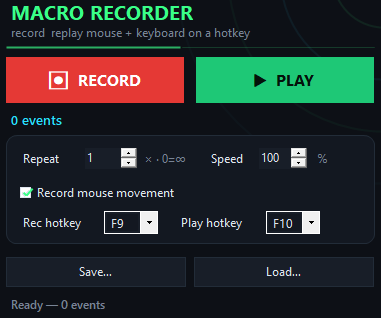
AOT Revolution Macro app window on Windows
See it in action
Inside the appAOT Revolution Macro window

Your farming routine plays back frame-perfect every time.

Once you record a single mission loop, the same grapple timing, boost sequence, and attack clicks repeat identically on demand. Replay speed adjusts from slow debugging to 10x faster finish — compress a five-minute farming run into thirty seconds if you want.

Exact input replayEvery keystroke and click lands in the same order and timing, so your character repeats the identical mission path.
Run 50 times in a rowSet the loop count and walk away — the macro handles all the grapple sequences, boost inputs, and attack chains without stopping.
Tweak speed if neededSlow the replay down to debug a tricky sequence or speed it up tenfold to race through your farming hours.
Versus other tools

How AOT Revolution Macro stacks against other farming tools.

Most game macro tools are either complicated, cloud-dependent, or risky for your account — this one does one thing cleanly.

 AOT Revolution MacroTypical game farming tool
Recording methodPress F9, play normallyScripting language or GUI builder
Offline storageRoutine saved as local fileCloud account or sync
Game compatibilityWorks in full-screen gamesOften blocked by full-screen mode
Speed controlSlider from 10% to 1000%Fixed speed or limited range
Setup complexityDownload and start recordingConfig files or wizard steps
PrivacyNo internet, no telemetryData collected or account login
What it does

What you are downloading.

Version1.0.0
PlatformWindows 10 and 11, 64-bit
InstallQuick download, no account
LicenseMIT, source on GitHub
PriceFree, no account
LanguageEnglish
Quick start guide

Record your first farming route in four steps.

You are ready to farm AFK-style in under a minute.

  1. Open the app and focus the gameStart AOT Revolution Macro and leave the window open, then click into the Attack on Titan Revolution client.
  2. Press F9, then play one missionHit F9 to begin recording, run through your farming routine with all your normal grapple, boost, and attack inputs, then press F9 again to stop.
  3. Press F10 to test the replayHit F10 and watch your character repeat the exact same sequence of moves you just recorded.
  4. Save the routine and start loopingGo to File → Save to keep your farming route as a file, then use the loop count slider to run it 10, 50, or as many times as you want.
Farming questions

Common questions about farming with macros

Will this get me banned from Attack on Titan Revolution?

AOT Revolution Macro replays your normal keyboard and mouse inputs — it sends the same clicks and keystrokes you would send by hand, and does not modify the game or inject code. Whether automated farming breaks the game rules is for you to check with the game publisher's terms of service.

Does the routine work if I switch to a different monitor or resolution?

Keystrokes always replay fine. Mouse clicks are tied to screen coordinates, so a routine recorded on a 2560×1440 monitor may click in the wrong spot on a 1920×1080 screen. For portability across setups, stick to keyboard-heavy routines.

Can I loop the macro until I stop it manually?

Yes. Set the loop count to infinite and the routine will keep replaying until you close the app or press the stop button.

Do I need to be online for the macro to work?

The macro itself is fully offline — it replays your recorded inputs with no internet connection. Attack on Titan Revolution obviously requires a connection to the game servers to actually log in and farm.

Can I edit a saved farming routine?

You can load it and tweak the speed slider or loop count, but you cannot edit individual clicks or keystrokes. If you need to change the routine, record a new one.

What if my recorded mission takes four minutes but I want to speed it up?

Use the speed slider to replay at 200%, 500%, or even 1000% of the original pace. Your character will zip through the farming loop in seconds instead of minutes.

Is there a limit to how many routines I can save?

No. Each routine is a file on your hard drive, so you can save as many different farming routes as you want and switch between them any time.
Why record a route

Why record your farm route instead of clicking manually every time?

Because a single recorded mission frees up your hands and your attention for the next six hours straight.

Start farming hands-free today.

Download AOT Revolution Macro now, record one mission loop, and let your computer handle the repetition while you do something else.

Download for Windows
Latest release · v1.0.0

AOT Revolution Macro guides